TL;DR
I wanted one place to write about every project I build, always with the same structure, and then share each post on LinkedIn and X. The site is built with Astro and runs as an nginx container on my Dokploy VPS. Each post also gets cross-posted to dev.to and Hashnode, with a link back to the original here.
What is this?
It’s my personal build log. Each issue is one project, and I go through it always in the same order: what it is, why I built it, how it’s built, a demo, what went wrong, the numbers, and what I learned. This is issue 01, and it’s about the blog itself.
Why did I build it?
I’ve always wanted a public place to share what I find while building things. I don’t mean polished success stories. I mean how a project is actually put together, where it broke, and what I’d do differently next time.
What finally pushed me was noticing how much the way I build has changed. I don’t open VSCode anymore to build or improve a system. So time is less of a problem now, and ideas are more of one. And if an agent writes the code, sharing the code isn’t that useful either. Any frontier model can rebuild something very similar from a good prompt. That’s why every post here ends with that prompt.
What I tried first
| Option | Why it didn’t fit |
|---|---|
| Medium | It doesn’t give out API tokens anymore, so I couldn’t publish automatically |
| Substack | No public API |
| Hashnode only | Good API and audience, but the site wouldn’t be mine |
How did I build it?
Architecture
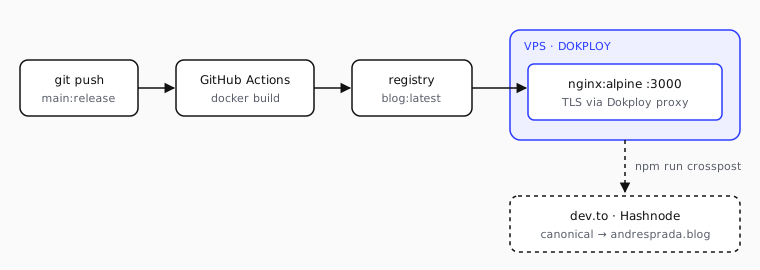
Fig. 1 · Solid = automatic on push to release. Dashed = manual, after publishing.
The only thing running on the server is nginx. When I push to the release branch, GitHub Actions builds a Docker image, pushes it to the registry and calls Dokploy’s application.deploy API. Dokploy’s proxy handles TLS in front of the container. I work on main, so nothing gets published unless I push to release on purpose.
Stack & dependencies
| Piece | Choice | Why |
|---|---|---|
| astro | ^7.3 | Markdown in git: publishing is a commit |
| @astrojs/mdx | ^8.0 | Components inside articles when needed |
| @astrojs/rss | ^4.0 | A feed for people who don’t live on LinkedIn |
| nginx | alpine-slim | Serves the static dist/ on :3000 |
| Dokploy | on my VPS | Same place as my other small projects |
Key decisions & trade-offs
I wanted the original of every post to live on my own site. The canonical URL always points here. Then npm run crosspost sends the same Markdown to dev.to and Hashnode with canonical_url set, so search engines know where it came from.
Every article also declares its project data in the frontmatter (status, stack, AI tools, build time). The spec strip at the top of this page is generated from it:
project: z.object({
  status: z.enum(['prototype', 'live', 'archived']),
  timeSpent: z.string().optional(),
  stack: z.array(z.string()).default([]),
  aiTools: z.array(z.string()).default([]),
})
How AI fit into the build
I decided what the blog should be and how it should look. The agents did the building.
- Design Canvas for the look: the spec-sheet layout, the about band, the issue table. Then the changes I made on the canvas were moved into the code.
- Opus 5.5 in Claude Code for everything else: the Astro site, the content schema, the Docker image, the deploy workflow and the cross-post script.
I spent most of the week going back and forth on details. The logo is a good example. Claude drew sheets of options, each one shown at real size in the header and as a 16px favicon, and I kept picking and asking for changes until I got what I wanted: > /AP, like a slash command, with a sparkle as the AI cursor.
The part I’d reuse in other projects is the /write-article skill. It reads the project’s repo first (dependencies, infra, git history), fills in everything the code can answer, and only then asks me about the rest, in two rounds at most. It’s not allowed to make up anecdotes or numbers. If I don’t have an answer, it leaves a TODO.
| Skill / tool | Used for |
|---|---|
/write-article |
Scaffolding each post, interviewing me, writing the social copy |
| archify | The architecture diagrams |
remotion-motion-graphics / onetake |
Turning screen recordings into demo videos |
Demo
You’re reading it: andresprada.blog. Every post is a Markdown file in the repo, and I publish by pushing to release. I still owe you a recording of /write-article drafting a post.
What went wrong
- The hardest part wasn’t technical. I kept going back and forth on who these posts are for. People skim them for the story, but agents will read the same page and try to reuse it. Writing for both at the same time made the first drafts worse. In the end I split them: the article is for people, and the “Replicate it” prompt at the end is for their agents.
- There are too many video skills. Remotion, onetake and others overlap, and it wasn’t clear which one was right for a short product demo. The first videos needed several rounds before I’d have posted them.
- Astro’s dev server kept serving old component styles after I edited them, twice in the same day. A change that worked looked broken until I restarted the server.
By the numbers
| Time | 6 days, Sunday Sep 27 to Friday Oct 2. The deploy pipeline went in on day one |
| Cost | €0 extra. The VPS already runs my other projects, and building runs on my Claude subscription |
| Lines of code | ~2,650 (Astro, TypeScript, CSS, scripts, CI), not counting the posts |
| Content | 2 builds, a fixed build template, an essay template |
| Users | You |
Lessons learned
Writing for people and agents at once didn’t work. Every paragraph got worse. One clear prompt at the end is more useful for an agent than a whole post written for it.
I set up the deploy before any design, and I’m glad I did. It went live on day one. After that I was changing something real, which is much easier to judge than a mockup.
Some things only make sense at real size. Icons, favicons and badges looked fine as big drawings. I only knew if they worked when I saw them in the header and in a browser tab.
The skill asks better questions after reading the repo. And it asks far fewer of them.
Replicate it
Paste this into Claude Code (or any coding agent) in an empty folder. Swap in your own domain and server.
Build me a personal build log: a blog where every post takes one project apart in the same structure, and that I can cross-post without losing the original URL.

1. Astro with Markdown in git, so publishing is a commit. Add MDX, RSS and a sitemap.
2. A typed content collection: `kind` (build or essay), `draft`, tags, and for builds a `project` block (status, time spent, stack, AI tools, repo, demo). Render a spec strip at the top of each build from that block.
3. A build template with fixed sections: TL;DR, What is this?, Why did I build it?, How did I build it? (architecture, stack, key decisions, how AI fit in), Demo, What went wrong, By the numbers, Lessons learned, Replicate it.
4. Ship it as a static nginx container. A push to a `release` branch builds the Docker image in GitHub Actions, pushes it to a registry and triggers a deploy on my Dokploy VPS through its API. Working on `main` must never publish.
5. A `npm run crosspost -- <slug>` script that publishes the same Markdown to dev.to and Hashnode with `canonical_url` pointing back to my site, rewrites root-relative image paths to absolute URLs, supports `--dry-run`, and writes the resulting URLs back into the frontmatter so re-runs are safe.
6. A Claude Code skill, `/write-article`, that interviews me about a project, fills the template, draws the architecture diagram, and writes the LinkedIn post and X thread.

Keep everything I publish under `public/` with root-relative paths, and confirm with me before anything public happens.